TradeLingo

外贸人的 WhatsApp Web
翻译与商机助手
Translator & deal assistant for export sales on WhatsApp Web

客户发来阿拉伯语、俄语、哈萨克语,你看到的是中文;你用中文写回复,发出去是客户的语言。它还帮你记住每个客户的报价、承诺和下一步。 Customer messages in Arabic, Russian or Kazakh show up in Chinese. You write your reply in Chinese and send it in the customer's language. It also keeps track of each customer's quotes, promises and next step.

  • 免费,MIT 开源Free, MIT licence
  • 支持 Chrome 和 Edge 电脑版Chrome and Edge on desktop
  • 当前版本 v0.9.0Version 0.9.0

暂未上架 Chrome 应用商店,需要手动加载,按安装教程做大约 5 分钟。TradeLingo 是独立开源项目,不是 WhatsApp 或 Meta 的官方产品。 Not on the Chrome Web Store yet: you load it by hand, which takes about 5 minutes with the install guide. TradeLingo is an independent open-source project, not an official WhatsApp or Meta product.

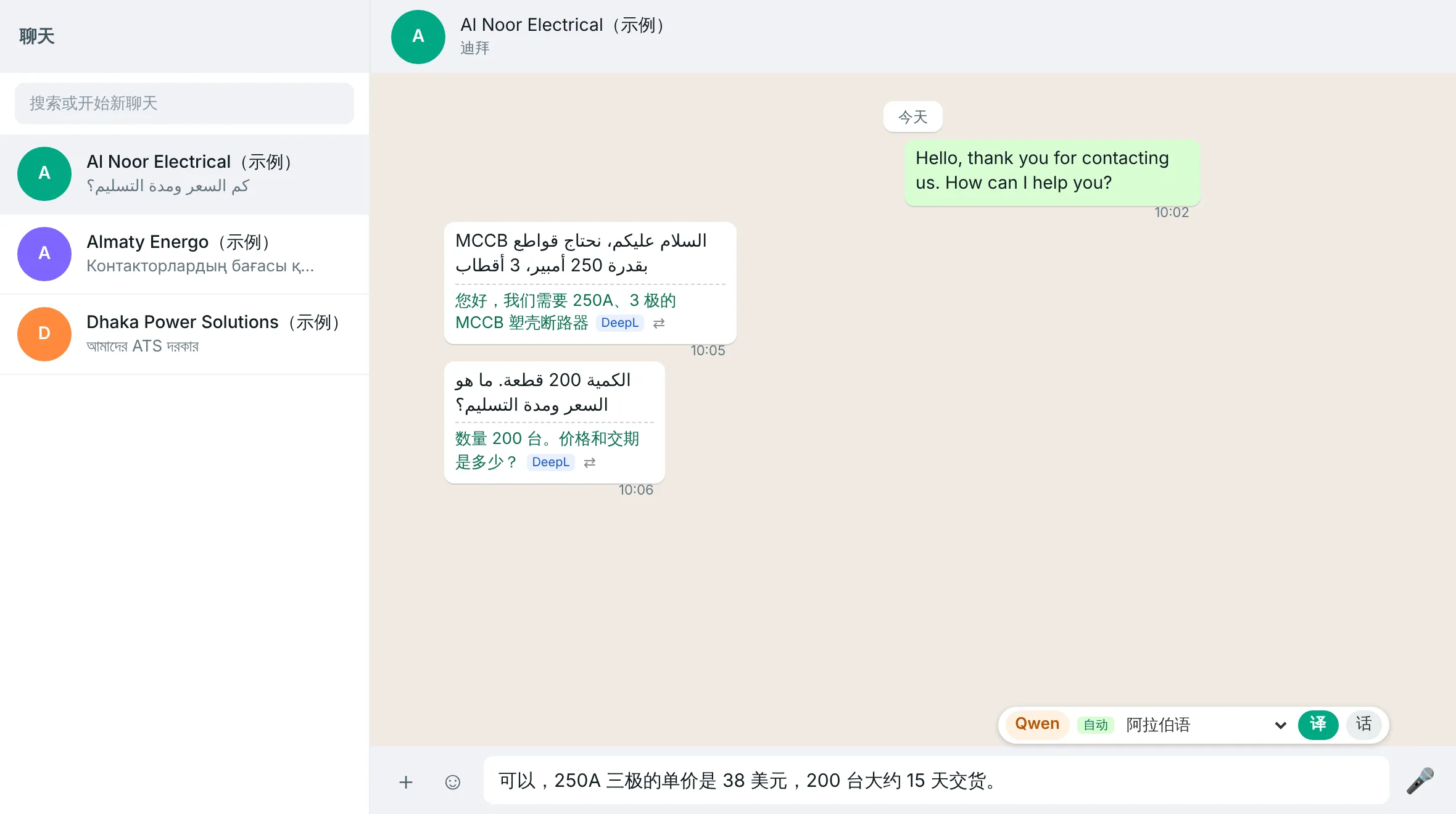
Al Noor Electrical 迪拜(示例)Dubai (sample)

الكمية 200 قطعة. ما هو السعر ومدة التسليم؟

数量 200 台。价格和交期是多少?DeepL

客户消息下方自动显示中文Chinese translation appears under each message
装好 TradeLingo 后的 WhatsApp 网页版:客户的阿拉伯语消息下方显示中文译文,输入框上方是翻译工具条
真实插件界面,客户名称和对话均为虚构。点图可放大。 Real extension interface; customer names and messages are fictional. Tap to enlarge. The screenshots show the Chinese interface; an English interface is also available.

回复可以译成 25 种外语,也可以译成繁体中文。 Replies can be translated into 25 foreign languages, and into Traditional Chinese. DeepL 不支持,由 AI 引擎翻译Not supported by DeepL; translated by the AI engines

  • العربية
  • Русский
  • Қазақша
  • বাংলা
  • Oʻzbekcha
  • English
  • Español
  • Português
  • Français
  • Türkçe
  • हिन्दी
  • اردو
  • فارسی
  • Tiếng Việt
  • ไทย
  • Bahasa Melayu
  • Filipino
  • Bahasa Indonesia
  • Українська
  • Polski
  • Deutsch
  • Italiano
  • Nederlands
  • 日本語
  • 한국어

客户遍布全球,语言却不止英语Your customers are everywhere, and not all of them write English

复制、翻译、再粘贴Copy, translate, paste back

客户发来一段阿拉伯语或哈萨克语,复制到翻译网站,看懂了再写,写完再翻,再粘贴回 WhatsApp。一天来回几十次。A customer writes in Arabic or Kazakh. You copy it into a translation site, write your answer, translate it back and paste it into WhatsApp. Dozens of times a day.

一个数字翻错,就是一单的损失One wrong number costs an order

你看不懂自己发出去的外语。价格、数量、交期有没有被翻错,往往要等客户按错的数字下单才发现。You can't read the foreign-language text you just sent. If a price, quantity or lead time came out wrong, you may only find out when the customer orders on the wrong figure.

客户一多,全靠脑子记Too many customers to keep in your head

谁在等你的报价,答应了谁周五发 PI,哪个客户三天没回了。聊天记录一长,这些就埋在消息里。Who is waiting for your quote, whom you promised a PI by Friday, which customer has gone quiet for three days. In a long chat, all of it gets buried.

从看懂一条消息,到跟进每一单From reading one message to following up every deal

五个功能按一笔生意的顺序排列。截图都是插件的真实界面。Five features, in the order a deal happens. All screenshots show the real extension.

1/5看懂Read

客户消息自动翻成中文Customer messages translated into Chinese automatically

  • 打开聊天,译文自动出现在每条消息下方,标签写明是哪个引擎翻的。Open a chat and translations appear under each message, tagged with the engine used.
  • 觉得不准,点 ⇄ 换一个引擎重翻这一条。Not sure about one? Click ⇄ to retranslate it with another engine.
  • DeepL、通义千问 Qwen-MT、DeepSeek 三个引擎。一个出错(Key 无效、额度用完、服务故障),自动换下一个已填 Key 的引擎。Three engines: DeepL, Qwen-MT and DeepSeek. If one fails (invalid key, quota used up, outage), the next engine with a key takes over.
  • 孟加拉语、哈萨克语等 DeepL 不支持的语言,自动交给 AI 引擎。Languages DeepL doesn't support, such as Bengali and Kazakh, go to the AI engines automatically.

中文、纯数字、表情和链接自动跳过,不消耗额度;翻过的句子本地缓存,不重复计费。Chinese text, numbers, emoji and links are skipped. Translated sentences are cached locally, so you aren't charged twice.
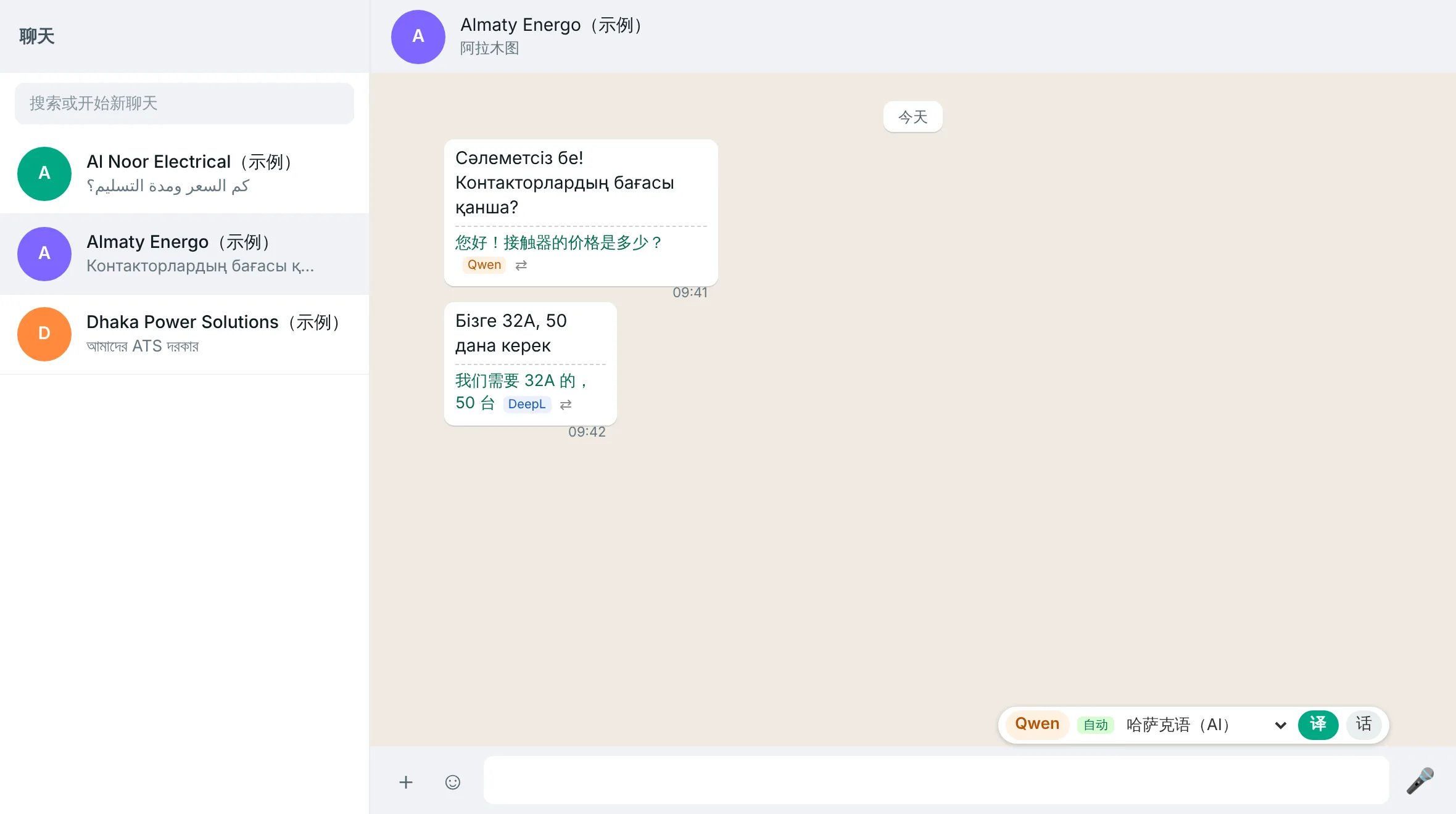
哈萨克语客户的消息下方显示中文译文,标签分别为 Qwen 和 DeepL
2/5说对Reply right

写中文,发外语,发之前先核对Write in Chinese, send in theirs, check before sending

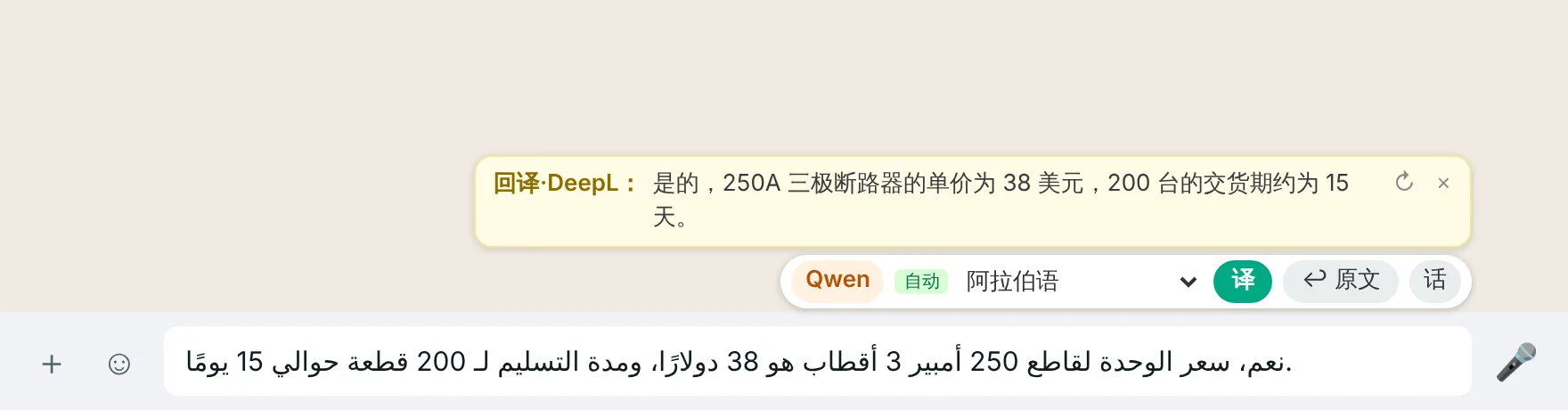
  • 在输入框写中文,点工具条上的“译”或按 Alt+T,中文换成客户的语言。Write Chinese in the message box, click 译 on the toolbar or press Alt+T, and it is replaced with the customer's language.
  • 黄色回译框把译文再翻回中文,价格、数量、交期有没有走样,一眼就能看到。A yellow back-translation box translates it back into Chinese, so you can check prices, quantities and lead times at a glance.
  • 术语表让专业词每次都译得一样,例如“塑壳断路器 = MCCB”。A glossary keeps technical terms consistent, for example 塑壳断路器 = MCCB.
  • 插件从不替你发送消息。The extension never sends a message for you. 确认无误后,回车由你自己按。You press Enter yourself.
输入框里是阿拉伯语译文,上方黄色回译框显示:250A 三极断路器单价 38 美元,200 台交期约 15 天
3/5说快Reply fast

记住每个客户的语言,话术一键调出Each customer's language remembered, saved phrases one keystroke away

  • 切换客户,发送语言自动跟着变。用 Chrome 自带的语言识别,不消耗翻译额度。Switch chats and the reply language switches with you. Detection uses Chrome's built-in language detector, with no translation quota used.
  • 识别不对,或客户更习惯另一种语言,可以为这个客户手动固定。Wrong guess, or a customer prefers another language? Pin it for that chat.
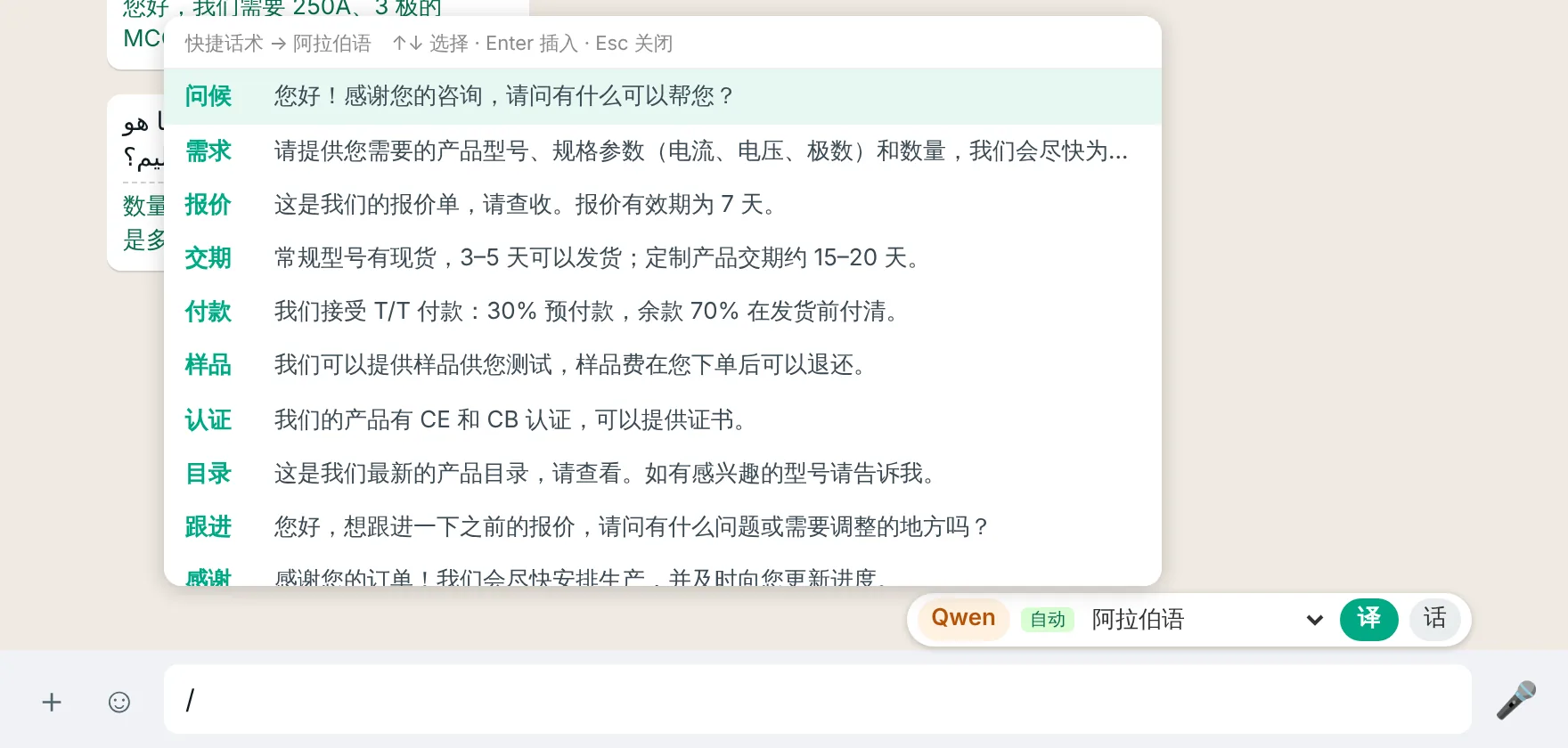
  • 在输入框输入 / 加关键词(如 /报价、/交期),插入事先存好的中文话术,自动翻成当前客户的语言。Type / plus a keyword (such as /报价 for quote or /交期 for lead time) to insert a saved phrase, translated into the current customer's language.

示例话术里的交期、付款比例、认证只是示例,用之前请改成你们公司的实际情况。The sample phrases' lead times, payment terms and certificates are examples only. Edit them to match your company before use.

输入 / 后弹出的快捷话术菜单:问候、需求、报价、交期、付款、样品、认证等,将翻译成阿拉伯语
4/5成交Close

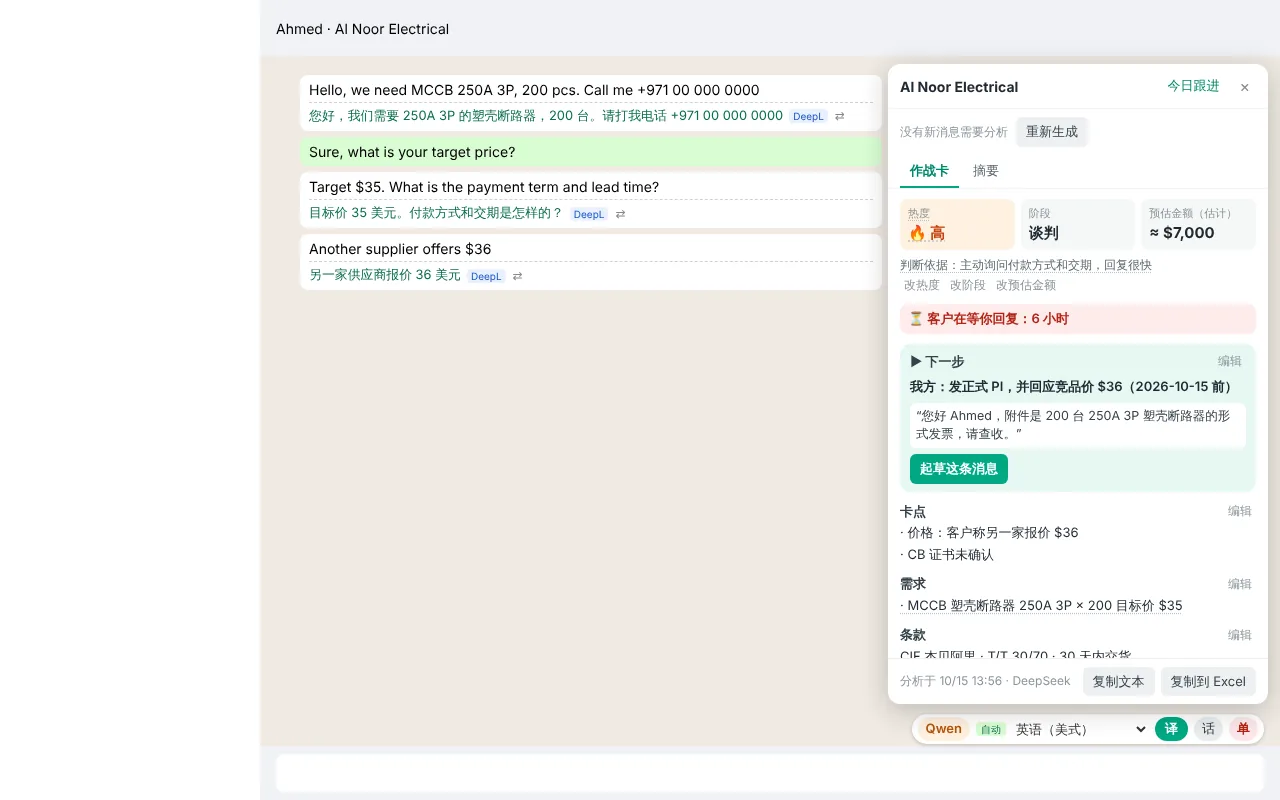
一键把聊天整理成商机作战卡Turn a chat into a deal battle card in one click

  • 点工具条上的“单”,DeepSeek 把当前聊天整理成一屏:热度和判断依据、阶段、预估金额、卡点、双方承诺、报价记录、缺失信息。Click 单 on the toolbar and DeepSeek sums up the chat on one screen: heat and the evidence for it, stage, estimated value, blockers, promises on both sides, price history and missing information.
  • “下一步”附一条写好的中文消息,点“起草这条消息”就翻译成客户的语言填进输入框;缺失信息可以一键生成追问。The next step comes with a drafted message; one click translates it into the customer's language and puts it in the message box. Missing information gets one-click follow-up questions.
  • 每一项都能查到出自哪条消息,没有依据的写“未知”,不瞎猜。Every item links to the message it came from. Anything without evidence says "unknown".
  • 之后更新只发新消息,AI 的改动以建议形式出现,由你采纳;你手动改过的字段不会被覆盖。Updates send only new messages. AI changes appear as suggestions you accept or ignore, and fields you edited stay as you left them.

热度和金额是 AI 的估计,以聊天原文为准。作战卡只用 DeepSeek,需要填 DeepSeek 的 Key。Heat and value are AI estimates; the chat itself is the source of truth. Battle cards use DeepSeek only and need a DeepSeek key.

商机作战卡:热度高、阶段谈判、预估金额约 7000 美元、客户在等你回复 6 小时、下一步和起草按钮、卡点和需求
5/5不漏单Follow up

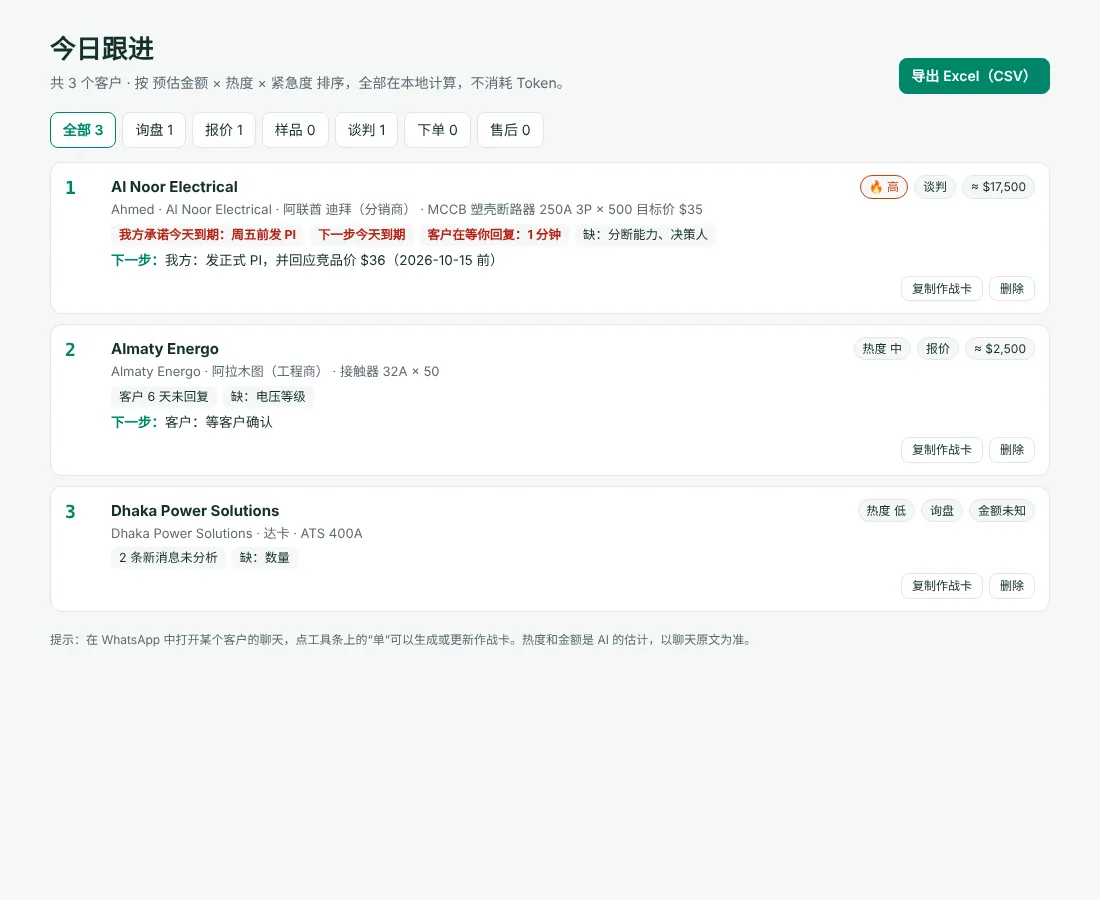
今日跟进:先处理最值钱、最急的客户Today's follow-up: the most valuable, most urgent customers first

  • 所有作战卡按“预估金额 × 热度 × 紧急度”排序,每个客户写明排在这里的原因。All battle cards ranked by estimated value × heat × urgency, with the reason for each position.
  • 你的承诺到期、客户等你回复太久时,弹出桌面提醒;每天早上推送一条早报。Desktop reminders when your promise is due or a customer has waited too long, plus a morning digest.
  • 没点开的聊天也能提醒:插件会读取左侧聊天列表的未读数。Reminders work even for chats you haven't opened, using the unread counts in the chat list.
  • 可以导出 Excel(CSV),发给同事或老板。Export to Excel (CSV) for your team or your boss.

排序和提醒都在你的电脑上计算,不消耗 Token。Ranking and reminders are computed on your computer, at no API cost.

今日跟进页面:三个示例客户按金额、热度和紧急度排序,右上角有导出 Excel(CSV)按钮

三步装好Install in three steps

插件还没上架 Chrome 应用商店,需要用“开发者模式”手动加载。不用写代码,跟着做就行。The extension isn't on the Chrome Web Store yet, so you load it in Developer mode. No coding needed.

  1. 下载并解压Download and unzip

    点上面的“免费下载 ZIP”,解压后找到里面的 extension 文件夹,放在一个固定的位置,以后不要删除或移动。Click "Download ZIP" above and unzip it. Find the extension folder inside and keep it somewhere permanent. Don't move or delete it later.

  2. 加载到浏览器Load it into the browser

    在地址栏输入 chrome://extensions,打开右上角的“开发者模式”,点“加载已解压的扩展程序”,选择 extension 文件夹。Go to chrome://extensions, turn on Developer mode (top right), click "Load unpacked" and choose the extension folder.

    Edge 用户打开 edge://extensions,开关在左侧。On Edge, go to edge://extensions; the switch is on the left.

  3. 跟着向导填 API KeyFollow the setup wizard

    装好后会自动打开使用向导:选一个翻译引擎,照着步骤申请并粘贴 Key,点“保存并测试”,看到“连接成功”后刷新 WhatsApp 网页版。A setup wizard opens automatically: pick a translation engine, follow the steps to get and paste a key, click 保存并测试 (Save & test), and once it says connected, reload WhatsApp Web.

打开详细图文教程Open the step-by-step guide

包括 Edge 安装、升级到新版本、换电脑迁移数据。Includes Edge, updating to a new version and moving to another computer.

三个翻译引擎,去哪申请 KeyThe three engines and where to get a key

插件免费,翻译费用由你直接付给服务商,没有中间商。至少填一个 Key 就能用。The extension is free. Translation is paid directly to the provider you choose, with no middleman. One key is enough to start.

引擎Engine 默认用途Default use 特点Strengths 费用Cost 去哪申请 KeyGet a key
DeepL DeepL 翻译收到的消息Incoming messages 速度快、稳定;不支持孟加拉语、哈萨克语等语言Fast and stable; doesn't support Bengali, Kazakh and some others 免费版每月 50 万字符Free plan: 500,000 characters a month deepl.com → 账户 → API Keys→ Account → API Keys
Qwen-MT Qwen 翻译你发出的回复Your outgoing replies 阿里云通义千问的专用翻译模型,92 种语言,严格执行术语表Alibaba Cloud's dedicated translation model, 92 languages, applies your glossary strictly 按用量计费,费用很低Pay as you go, very low cost 阿里云百炼Alibaba Cloud Model Studio → API Key(地域推荐“华北2(北京)”)→ API Key (Beijing region recommended)
DeepSeek DS 翻译备用;商机作战卡只用它Translation fallback; the only engine for battle cards 能参考最近的聊天上下文,可以调整语气Uses recent chat context; adjustable tone 按用量计费,需先充值Pay as you go, prepaid balance platform.deepseek.com → API Keys→ API Keys

推荐 DeepL 和 Qwen-MT 都填:收到的消息用 DeepL,发出的回复用 Qwen-MT;想用商机作战卡,再加 DeepSeek。价格以各平台官网为准。 Recommended: add both DeepL and Qwen-MT (DeepL for incoming, Qwen-MT for replies), and DeepSeek if you want battle cards. See each provider's site for current prices.

你的数据去了哪里Where your data goes

TradeLingo 没有自己的服务器,也不收集任何统计数据。要翻译的文字会离开你的电脑,但只发给你自己选的服务商。TradeLingo has no server of its own and collects no analytics. Text being translated does leave your computer, but only to the provider you chose.

  • 只在翻译时发送Sent only when translating 收到的消息、你写的回复、快捷话术和回译内容,从浏览器直接发给你选的服务商,按该服务商的隐私政策处理。翻译敏感报价前,可以先看看它的政策。Incoming messages, your drafts, quick phrases and back-translations go straight from your browser to the provider you chose, under that provider's privacy policy. Check it before translating sensitive quotes.
  • 作战卡只在你点击时生成Battle cards only when you click 点“生成”或“更新”时,把当前聊天最多 80 条可见消息发给 DeepSeek,电话号码先打码。When you click Generate or Update, up to the last 80 visible messages of that chat go to DeepSeek, with phone numbers masked first.
  • 提醒和排序在本地完成Reminders and ranking stay local 今日跟进、桌面提醒和每日早报都在你的电脑上计算,不发送到任何地方。客户语言识别用的也是 Chrome 自带的本地功能。Today's follow-up, reminders and the digest are computed on your computer and sent nowhere. Language detection uses Chrome's on-device detector.
  • 检查更新只读版本号Update checks only read a version number 每天一次从 GitHub(打不开时用 jsDelivr 镜像)下载公开的版本号文件,不发送你的任何数据,可以在设置里关闭。Once a day the extension downloads a public version file from GitHub (or the jsDelivr mirror). None of your data is sent, and you can turn it off in settings.
  • 代码全部公开All code is public 没有构建步骤,没有第三方依赖,你看到的源码就是运行的代码。详见隐私说明。No build step and no dependencies: the source you read is the code that runs. See the privacy notes.
使用前请了解:Before you use it: 插件会修改你浏览器里的 WhatsApp 网页,这可能不符合 WhatsApp 的服务条款。插件只读取和翻译文字,从不自动发送消息,但请自行判断,风险自负。机器翻译也可能出错,重要内容发送前请核对。 The extension modifies the WhatsApp Web page in your browser, which may not be permitted by WhatsApp's Terms of Service. It only reads and translates text and never sends messages by itself, but use it at your own risk. Machine translation can be wrong; check important details before sending.

常见问题Questions

要花钱吗?Does it cost anything?

插件本身免费、开源。翻译要用你自己申请的 API Key,费用直接付给服务商:DeepL 免费版每月有 50 万字符额度;Qwen-MT 和 DeepSeek 按用量计费,费用很低。翻过的句子会缓存,不重复计费。设置页会显示每个引擎本月用了多少字符,用量心里有数。具体价格以各平台官网为准。The extension is free and open source. Translation uses your own API keys, paid directly to the provider: DeepL's free plan includes 500,000 characters a month; Qwen-MT and DeepSeek are pay-as-you-go at low cost. Translations are cached, so the same sentence isn't charged twice. Settings show how many characters each engine used this month. Check each provider's site for current prices.

为什么不在 Chrome 应用商店里?Why isn't it on the Chrome Web Store?

目前还没有上架,所以要用“开发者模式”手动加载。这是 Chrome 和 Edge 自带的正规功能,按安装教程做大约 5 分钟。It hasn't been published there yet, so you load it in Developer mode, a standard feature of Chrome and Edge. The install guide takes about 5 minutes.

会不会自动替我发消息?Will it send messages for me?

不会。插件只把输入框里的中文换成译文,发不发、什么时候发,都由你自己按回车决定。作战卡的“起草这条消息”也只是填进输入框。No. It only replaces the text in the message box with the translation; you decide whether and when to press Enter. "Draft this message" on the battle card also only fills the message box.

装好了,但消息下面没有译文Installed, but no translations appear

先刷新 WhatsApp 网页,安装或升级后必须刷新。再打开插件设置,确认“启用插件”和“自动翻译收到的消息”已勾选,并且至少有一个引擎测试成功。还不行的话,可能是 WhatsApp 网页改版了:打开一个聊天,按 Alt+Shift+D 复制诊断信息(不含消息内容和电话),提交到 GitHub Issues。Reload WhatsApp Web first; that's required after installing or updating. Then open the settings and check that the extension and automatic translation are on and at least one engine passed its test. If it still doesn't work, WhatsApp Web may have changed: open a chat, press Alt+Shift+D to copy diagnostic info (no message text or phone numbers) and post it in GitHub Issues.

从 v0.9.0 起,如果 WhatsApp 改版导致插件认不出消息或输入框,页面左下角会直接弹出提示,可以一键检查插件更新、复制诊断信息。From v0.9.0, if a WhatsApp change means the extension can't find messages or the message box, a notice appears at the bottom left of the page with one-click update check and diagnostics.

Qwen-MT 提示“API Key 无效”Qwen-MT says the API key is invalid

最常见的原因是地域不一致:Key 和地域是绑定的。在设置页把地域改成你创建 Key 时所在的地域(推荐“华北2(北京)”),再点“保存并测试”。Usually the region doesn't match: keys are tied to a region. In settings, choose the region where you created the key (Beijing is recommended), then click Save & test again.

插件界面有英文吗?Is the extension's interface available in English?

有。从 v0.9.0 起,插件支持中文和英文界面:在设置页“界面语言 / Language”里选择。新安装时默认跟随浏览器语言,老用户升级后保持中文。欢迎在 GitHub 上贡献其他语言的界面翻译。Yes. From v0.9.0 the interface is available in English and Chinese: choose it under 界面语言 / Language in settings. New installs follow your browser language. Contributions for other languages are welcome on GitHub.

怎么升级?换电脑后数据怎么办?How do I update, or move to another computer?

从 v0.8.0 起,有新版本时插件图标上会出现红色的“新”,设置页顶部有更新内容和下载按钮。From v0.8.0, a red 新 badge on the icon tells you when an update is available, and the top of the settings page shows what changed with a download button.

升级:用新下载的文件覆盖原来的 extension 文件夹,在扩展程序页面点插件卡片上的 ⟳,再刷新 WhatsApp。一定要覆盖同一个文件夹,换文件夹加载会丢失已填的 Key 和设置。To update, overwrite your existing extension folder with the new files, click ⟳ on the extension card and reload WhatsApp. Always use the same folder: loading from a new one starts with empty settings.

换电脑或换浏览器:在设置页“备份与恢复”导出一个文件,到新环境导入即可,导入时与现有数据合并。To move, export a backup from Backup and restore in settings and import it on the new computer or browser; imports merge with existing data.

和应用商店里同名的 TradeLingo 是一回事吗?Is this the same as the other "TradeLingo" on the Chrome Web Store?

不是。Chrome 应用商店里有一个叫“TradeLingo — Learn Construction Spanish While Browsing”的插件,与本项目无关。本项目只从 GitHub 仓库下载。No. "TradeLingo — Learn Construction Spanish While Browsing" on the Chrome Web Store is unrelated. This project is only distributed from its GitHub repository.